 self-hosted · MIT · Pro or Max
See what your agent is actually doing. A live progress card pins to the chat, every Read, Bash, Edit landing in real time. Drives the stock claude CLI on your Pro or Max. No API keys, no second invoice.
Built for my problems. Open-sourced for yours.
Scheduled: morning briefing
mainKlanker, triage the overnight checkout-timeout crash. Show me the diff before you touch…
src/checkout/session.ts"timeout" across 12 files (0.9s)await on Promise.race- Promise.race([fetch(url), timeout(5000)]) + await Promise.race([fetch(url), timeout(5000)])
await. 2 new tests cover the race. Ready to commit and open a PR?
You want Claude on your phone, remembering last week, showing what it's doing. One agent that knows everything is a demo. A fleet of specialists, each shaped for a part of your life, is a workforce. On the subscription you already pay for.
Message in, eventually a message out. The middle is a black box. Stuck, working, crashed? No idea until it comes back. If it comes back.
Claude Code is a terminal app. It sleeps when the laptop sleeps. Mobile Claude is a chat with no files, no shell, no continuity. Your life happens away from the keyboard.
Anthropic cut third-party tools off Pro and Max. OpenClaw and friends still run, on pay-per-token API keys. Switchroom drives the CLI Anthropic ships. Same OAuth. No second invoice.
Switchroom drives the stock claude CLI. Each persona is a long-running service with its own Telegram bot, joined by IPC. One bot per agent, one topic per agent. Survives reboots, network drops, your laptop closing. You plug the cords. Switchroom holds the panel.
Not a harness. Doesn't patch the CLI, doesn't intercept the protocol, doesn't forge tokens. Scaffolds files, starts processes, routes messages. Gets out of the way.
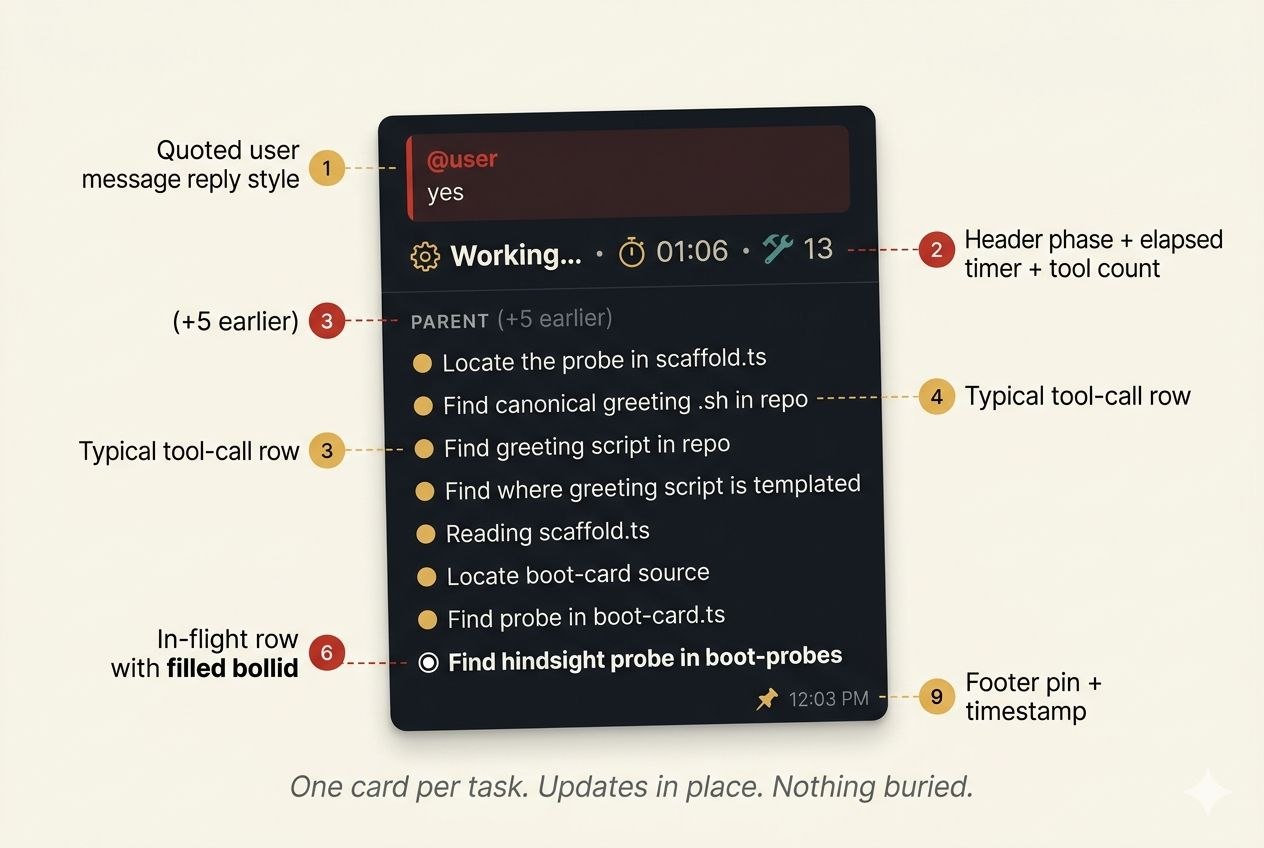
A progress card pins to the chat when work starts and updates as tools fire. Read, Bash, Edit, Grep, each lands with elapsed time. Sub-agent work gets its own section. Two tasks at once? Cards are labelled (1/N) so you never lose the plot.
Morning digest from klanker. Coding buddy for PR triage. Night-shift agent scanning logs. Each has its own voice, memory, topic, tools. Add one the way you add a contact, not like you're migrating a service.
Same OAuth as your desktop Claude Code session. Runs on your plan's quota, resets on Claude's clock. Hit the ceiling, the product says so. No API bill running in the background.
Scheduled tasks that fire across reboots, not a hack. Cron syntax in YAML, per-task model selection, output delivered to Telegram. Morning briefing at 8 AM, weekly review Sunday night, hourly on-call digest. Survives reboots, survives the laptop being shut.
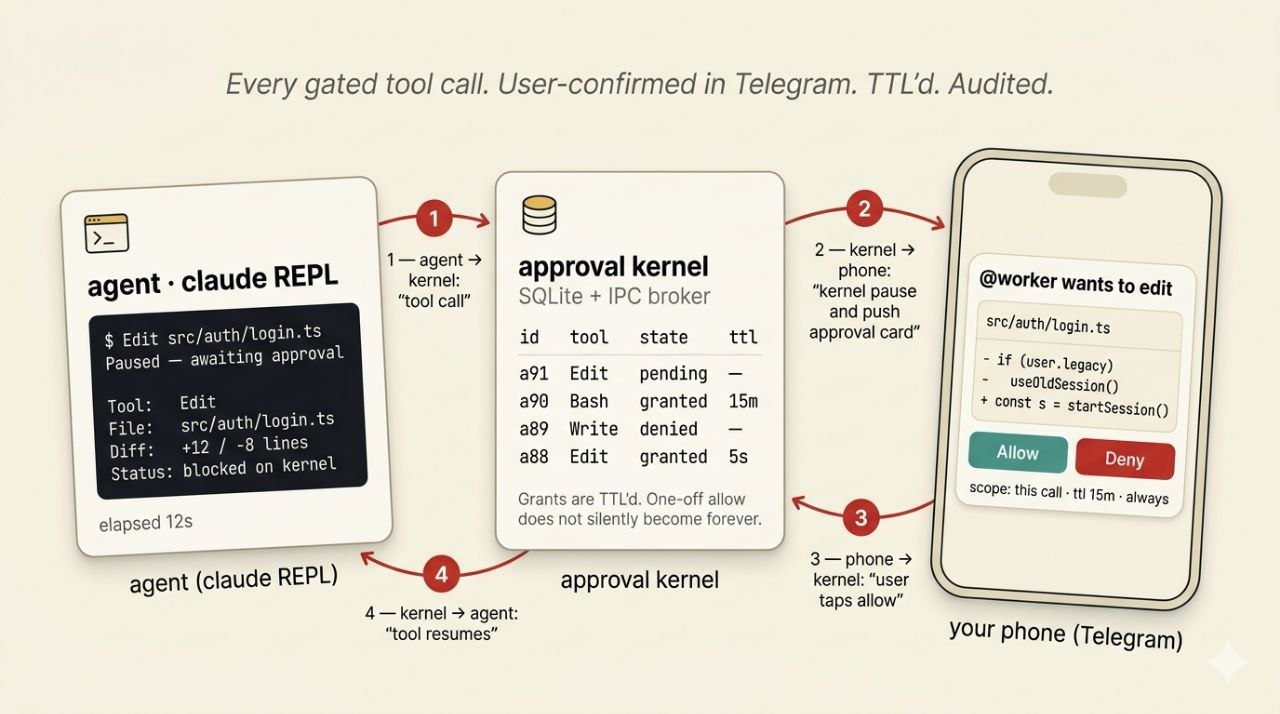
Read-only tools run free. Anything that writes, runs a shell, fetches the web, or touches Drive pauses for a tap.
Switchroom ships an approval kernel. Every gated tool call goes through an IPC broker into a SQLite kernel, the agent pauses, and an inline card lands in your topic with the tool name, the args, and a diff if there is one. ✅ Allow resumes the call. ❌ Deny kills it cleanly. Grants are TTL'd so a one-off Allow doesn't quietly become forever.
Every decision is appended to card-events.jsonl: who approved, when, what tool, what args, what the result was. Forensic replay if you ever need it.
The kernel underwrites Drive too. Drive MCP is opt-in via switchroom drive connect, then every write or destructive call surfaces the same Allow/Deny card with the file in question. No silent fan-out.
Top row earns the visibility. Bottom row runs the fleet.
Each agent is a long-running service. Box reboots, the fleet comes back. A crash auto-recovers with an audit trail, not silence. Context exhaustion is a named event. Scheduled work fires across reboots. Ask "is everything healthy" and get a real answer.
Permission prompts come through Telegram as ✅ Allow / ❌ Deny buttons. Read-only tools are pre-approved. Bash, Edit, Write, WebFetch gate through you. PI-safe envelopes sanitize inbound untrusted text.
A follow-up while a task runs amends in place. Prefix with /queue to file a new task instead, cleanly, no bleed. The agent tells you which it did so you can correct if it picked wrong.
Hindsight semantic memory per agent. Knowledge graph built from daily notes, directives, and mental models, surfaced at the right moment. You tell klanker something Tuesday, it comes back next Tuesday. MEMORY.md and workspace file search handle the rest.
Telegram is the surface. Start a task walking to the shops, pick up the reply at dinner. Attachments are real input, not stripped. Notifications fire on the bit that mattered, not every edit.
Add an agent by editing YAML. Graft a skill onto an existing one without touching its core. MIT-licensed TypeScript. Profiles and skills are plain files you fork in your own repo. No framework to learn.
Opt in with switchroom drive connect <agent>. Desktop-loopback OAuth, no service-account JSON. Reads run free, every write hits the approval kernel as an inline card with the file and the change. Configure scope and defaults in the drive: block.
Scaffolds files. Starts processes. Routes messages.
Each agent runs the stock claude CLI as a long-running service alongside its own gateway (Telegram bot, MCP plugin, SQLite buffer). They talk over IPC. Manage either with switchroom agent start|stop|restart. Per-agent logs you can grep.
Each agent has its own pool of Claude OAuth slots, scoped to its own CLAUDE_CONFIG_DIR. switchroom auth login <agent> for the first slot, switchroom auth add <agent> for fallbacks. Hit the active slot's quota, the next one in the pool takes over.
One bot per agent, one topic per agent. Inline approvals, slash commands, handoff briefings on restart.
Switchroom scaffolds .claude/agents/*.md. Sub-agents delegate through Claude Code's built-in machinery. Not a reimplementation.
Every agent gets AGENTS.md, SOUL.md, USER.md, MEMORY.md, daily notes, and an optional HEARTBEAT.md. Injected into the system prompt. Budgeted.
# One file. The whole fleet.
switchroom:
  version: 1

telegram:
  # Per-agent bot token. DM-only by default.
  bot_token: "vault:telegram-bot-token"

defaults:
  model: opus
  tools: { allow: [all] }
  subagents:
    worker:
      description: "Implementation tasks"
      model: sonnet
      background: true
      isolation: worktree

agents:
  assistant:
    topic_name: "General"
    extends: executive-assistant

  klanker:
    topic_name: "Klanker"
    extends: coding
    schedule:
      - cron: "0 8 * * 1-5"
        prompt: "Morning briefing"
You pay for Pro or Max. You want Claude in Telegram, remembering your projects, available from the couch. No second bill.
Pi or mini-PC humming in a closet. You'd rather edit YAML than sign up for a SaaS.
You want an assistant that knows your docs, your calendar, your vibe. And a coding buddy. And a digest bot. Different personas, one panel.
A box you already have, 4GB RAM, Docker. A Pro or Max subscription. A Telegram bot token from @BotFather per persona. That's the lot.
ANTHROPIC_API_KEY anywhere in the stack.claude CLI, same binary as Claude Code. Your subscription covers it the way it covers desktop usage.claude binary underneath. Switchroom is the panel.⚠ Issue reply in the topic. No silent dropped work.switchroom drive connect <agent> wires up the Drive MCP via desktop-loopback OAuth (no service-account JSON). Reads are free; every write or destructive action goes through the approval kernel as an inline ✅ Allow / ❌ Deny card in Telegram, with the file and the diff. Disconnect any time with switchroom drive disconnect.claude CLI under your Pro or Max OAuth, so the subscription you already pay for is the ceiling. Both are legitimate. Depends whether you want integrated billing or fine-grained pay-as-you-go.claude binary with the official OAuth flow. No credential interception, no API key routing, no forked runtime. Full analysis in the compliance attestation.~/.switchroom/analytics-id is a random UUID, not tied to username, email, IP, or machine. Opt out any time with export SWITCHROOM_TELEMETRY_DISABLED=1. Full event catalogue in the posthog docs.